How to Organise Restaurant Supplier Invoices in Plate Margin
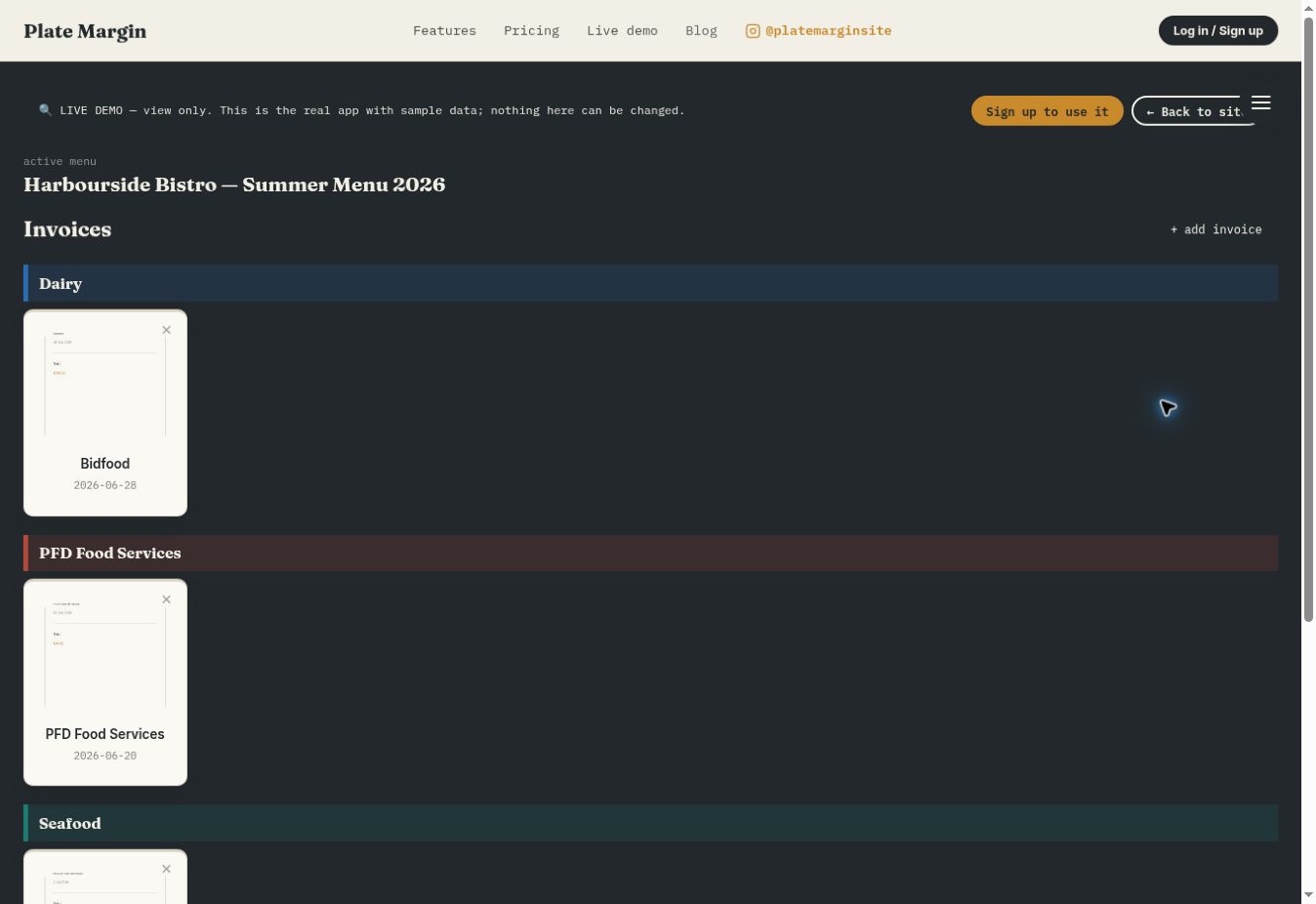
An invoice is easy to put down and surprisingly difficult to find again. By the time someone asks about a delivery, the paper may be in a chef’s folder, the PDF in a manager’s inbox and the photo on a phone that has already gone home.
Plate Margin gives the kitchen a place to keep those documents together. Its Invoices tab lets you attach a photo, scan or PDF, add the supplier and date, and organise the file under a supplier or category. A consistent filing habit makes the record easier to retrieve when a question comes back to the kitchen.
Give every invoice the same route into the system
Start by deciding who will file invoices and when. It might be the chef who receives the delivery, or a manager who collects the day’s paperwork before leaving. The important part is that the responsibility is clear enough to survive a busy service.
Keep the routine short. Receive and check the delivery, set aside any questions for the supplier, then save a readable copy of the invoice in Plate Margin. Filing it close to the delivery is easier than trying to reconstruct a week of paperwork on Friday afternoon.
If several people receive deliveries, agree on the same supplier names and categories before they start. A simple naming convention is more useful than a complicated folder system that only one person understands.
Add the document in the Invoices tab
In your kitchen account, open Invoices and select + add invoice. Enter the supplier, choose the invoice date and add a category if you want one. Attach the file, check the preview or file name, then select save invoice.
Plate Margin accepts invoice photos, scans and PDFs. Use a file under 4 MB. If you are photographing paper, flatten it first and check that the page edges, item descriptions and totals are readable. A clear photo taken once is more useful than several blurred copies.
The date should be the invoice date you want to find later. That keeps the record useful when somebody asks for a particular delivery rather than remembering when the photo was uploaded.
Choose supplier or category as your filing habit
Plate Margin groups invoices by the category you enter. If you leave the category blank, it uses the supplier instead. That gives you two straightforward ways to organise the kitchen’s paperwork.
Filing by supplier works well when most questions begin with a business name: “Can you find the last invoice from our produce supplier?” Leave the category blank and keep the supplier name consistent each time.
Categories are useful when the team thinks in purchasing areas such as Seafood, Dairy or Dry Goods. Enter the same category for related invoices, even when the suppliers differ. The supplier remains visible on each invoice card, so the team can still see where the document came from.
Avoid changing the approach halfway through the week. If “Dairy”, “Dairy delivery” and “Milk and cream” all describe the same filing group, agree on one label and use it consistently.
Make the file useful when someone opens it
Imagine a chef needs to check which product arrived with Tuesday’s delivery. A card with the correct supplier, invoice date and readable attachment gives them a clear starting point. A cropped photo of the total alone does not.
Before saving, check that the attachment includes the details your team will need:
- Supplier name and invoice reference.
- The invoice date.
- Product descriptions and quantities.
- All pages needed to understand the delivery.
If the supplier has already sent a clear PDF, use that rather than photographing a screen. Give the file a recognisable name before uploading so it is also understandable when opened later.
Connect the record to the kitchen’s follow-up
A filed invoice is useful evidence for a purchasing question, but somebody still needs to act on what it shows. If an ingredient’s pack size or price has changed, check the corresponding entry in Recipes and update it there. Saving an invoice attachment and maintaining recipe inputs are separate steps in the kitchen’s routine.
For a short delivery, substitution or damaged product, make sure the person handling the supplier query has the relevant document. Agree where your team records the open issue and who is following it up. Keeping the invoice accessible prevents the document itself from becoming another obstacle.
That connection matters more than the volume of files saved. A well-kept invoice record should help the chef answer a question, check an input or hand the right document to the manager.
Finish the week with a quick completeness check
Before the paperwork piles up, compare the week’s deliveries with the invoice files you expected to save. Look for missing suppliers, unreadable photos and dates entered incorrectly. Ask the person who received a delivery while the details are still fresh.
Keep your normal accounts and payment process in place. Use Plate Margin’s invoice record as the kitchen’s practical reference alongside its recipes and purchasing work.
The best filing system is one the team can maintain during an ordinary week. Start with a consistent supplier name, the correct date and a readable attachment for every delivery. Explore Plate Margin’s live demo and open Invoices to see how the files are grouped before bringing the same routine into your own kitchen.