Moving Your Kitchen Spreadsheets into Plate Margin
The costing spreadsheet is on the office computer. The prep sheet is in a folder by the pass. The latest recipe change is in a message on somebody’s phone. Each document may be useful on its own, but keeping them in step becomes another job for the head chef.
Moving your kitchen spreadsheets into Plate Margin starts with a working menu. Recipes sit at the centre, and their ingredients and methods feed the tools your team uses around them. The aim is to make one reliable entry do more of the work, while giving the kitchen a manageable way to change systems.
Start with the menu you are serving now
Choose one current menu for the first move. A lunch menu with a small team is often easier to check than several seasons of recipes and old ordering sheets. Keep the existing files available for reference while you build and review the new menu.
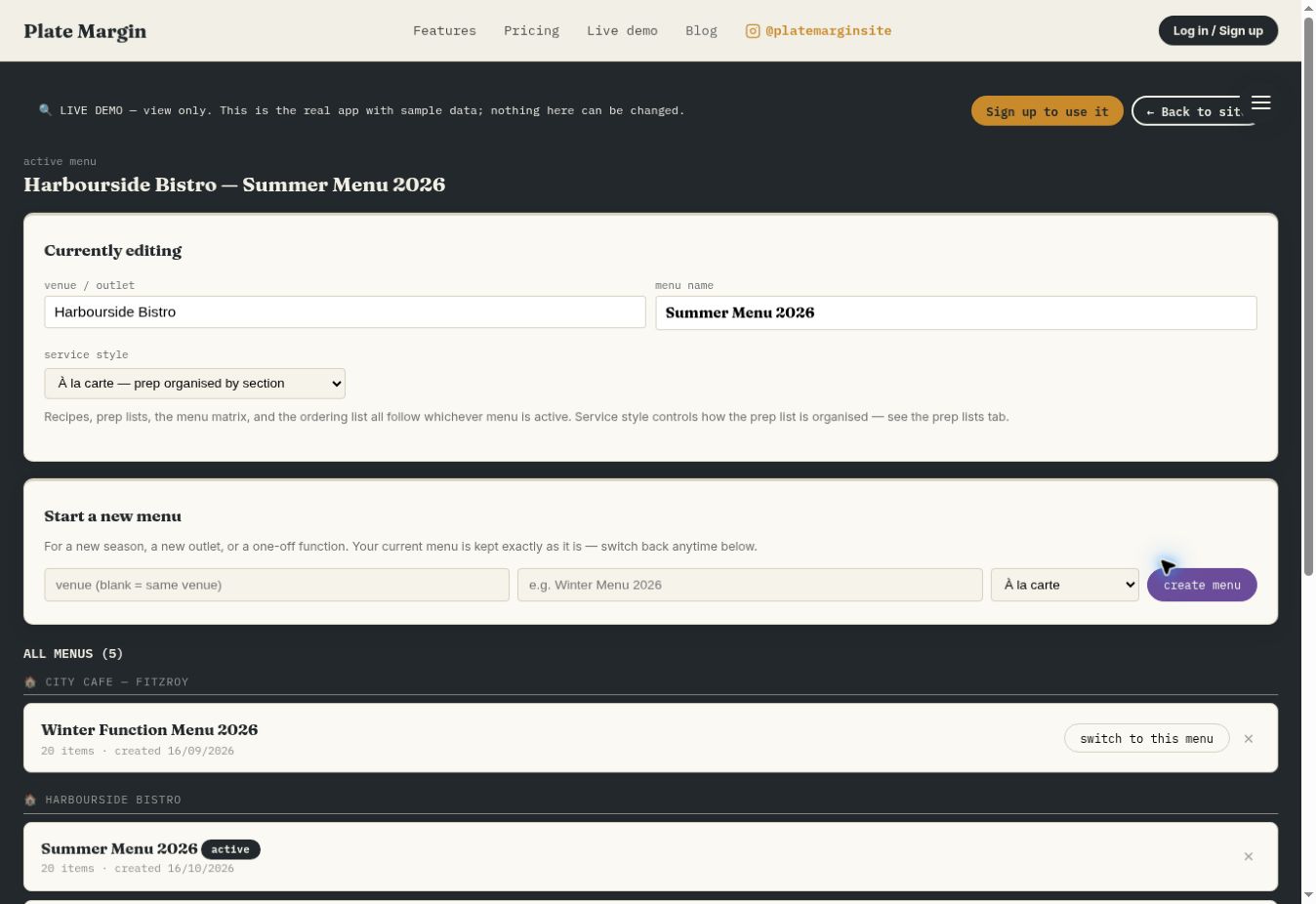
In Plate Margin, open Menus and enter the venue, menu name and service style. Use a name people will recognise during a busy shift, such as “Bistro Lunch — Spring 2026”. The active menu determines which recipes and connected lists the team sees, so this small setup decision matters every day.
Choose à la carte when prep should be organised by kitchen section. The function or banquet option brings prep together under one menu. Select the service style that matches how the kitchen will actually use the information.
Clean up the information before copying it
An old spreadsheet can contain three names for the same ingredient, a pack size that has changed and a method that no longer matches the plate. Transferring those entries without checking them carries the same uncertainty into a new system.
Gather the recipe the chef actually cooks, a recent supplier invoice or price reference, the current selling price and the intended yield. Agree on ingredient names with the person who normally orders. “Cream” and “thickened cream 2 L” may look similar on a hurried list, but the purchasing detail behind them matters.
You do not need to rewrite the whole kitchen’s records at once. Complete one dish properly, review it at the bench, and use that standard for the next entry.
Enter a complete dish in Recipes
Open Recipes and work through the full card for a menu item. Add its ingredients, pack cost, pack size and the amount used. Include the components the team needs to prepare, then write or paste the method into the recipe card.
Check the section as well as the numbers. A dish assigned to the wrong section can be correctly costed and still appear in the wrong place when the team looks for its prep. Clear ingredient and prep notes make the connected lists more useful from the start.
For example, a pasta dish might have prawns, pasta, chilli oil and a finishing garnish. Ask the chef responsible to compare the completed card with the actual plate. A missing garnish is easier to catch now than after the same omission has travelled into several kitchen documents.
Check what the recipe entry creates
Once the dish is entered, open the connected tools and inspect the result. Plate Margin builds the menu’s Recipe Book from the recipe information. Its ingredients also appear in Prep Lists and Stock & Ordering.
This is the point where the move should start making sense to the team. They can follow a dish from its recipe card to the documents used to prepare and purchase for it, rather than being asked to trust another separate file.
Check that the method reads clearly, the ingredient names are recognisable and the prep sits in the right section. Correct the recipe entry before relying on the documents built from it. Add the remaining dishes in small groups so mistakes are caught while they are still easy to trace.
Give the first week a clear owner
Ask one chef to oversee the move and a second person to check the completed entries. Decide who will maintain supplier prices, who will keep methods current and who will prepare the working lists. Shared access works best when everyone knows which information they are responsible for maintaining.
A practical first week could look like this:
- Before the first shift, set up the active menu and enter a small group of familiar dishes.
- At the bench, compare those cards with the portions and methods the team uses.
- Before ordering, inspect the ingredient list against the menu and current supplier information.
- After the first few services, resolve missing details and bring across the next group of dishes.
Keep one agreed place for live edits. If changes continue in the spreadsheet and in Plate Margin independently, the team soon has two competing versions again.
Move the workflow, not just the files
The useful change is what happens after the first menu is in place. When the chef adjusts a recipe, the team should know to return to that recipe entry and review the connected information. When the menu changes, they should confirm the active menu before preparing their working documents.
You can keep past files as an archive while the current service moves onto the shared system. There is no need to make a quiet Tuesday depend on a complete historical data project.
Start with one menu, check it with the people who cook it, and build from there. Open Plate Margin’s live demo to follow the route from Menus to Recipes, Recipe Book, Prep Lists and Stock & Ordering before setting up your own kitchen.